Where can I find my Google Ads tag ID?
In Basic settings, the Your Google Ads tag ID field requires your advertising tag ID, including its AW- prefix.
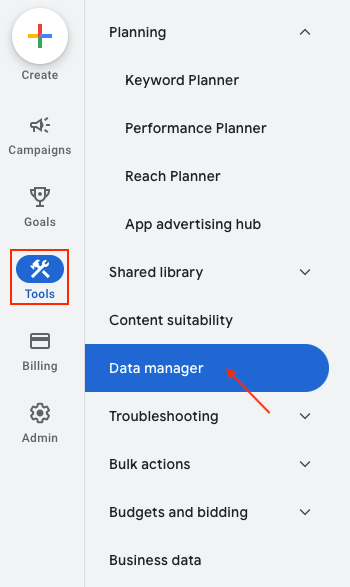
- Sign in to the correct Google Ads account and open Tools → Data manager.
- Under Google tag, click Manage.
- Under Your Google tag, select the tag to open Tag details.
- Find the advertising ID starting with
AW-, for exampleAW-123456789. Copy the complete value into the module. - Save the Basic settings tab.
Use the ID of the relevant Google Ads destination, rather than your Google Ads account number or an Analytics measurement ID starting with G-. If your tag has several associated IDs, check which Ads destination you need.
Read Google’s instructions for finding your tag ID.
After saving the ID, test the tag on your store.
Visual reference: Tools → Data manager. Account navigation may change; then follow the steps above to open the tag details.