How to write my category descriptions with the help of AI?
Before starting, configure the module and check your subscription and available quota.
Open the tool
Open “E-commerce Copilot”, then “Copilot for writing content”.
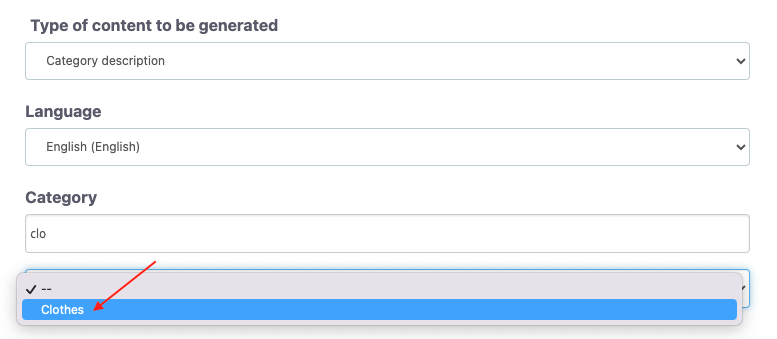
- Choose a category description, additional category description (from PrestaShop 8.0 onward) or category meta-description.
- Select the language in which to generate the content.
- Start typing the name of the category and select the matching result. Search uses names or titles in your back-office interface language.
- Click “Generate”, then wait for the preview.
- Read the content, correct it if necessary, then click “Save”.
Important: we recommend that you always proofread the generated text to ensure it remains coherent, respects the context and reflects your store’s style. Check factual information, amounts, commercial terms and links. Take care to retain useful HTML tags where present.
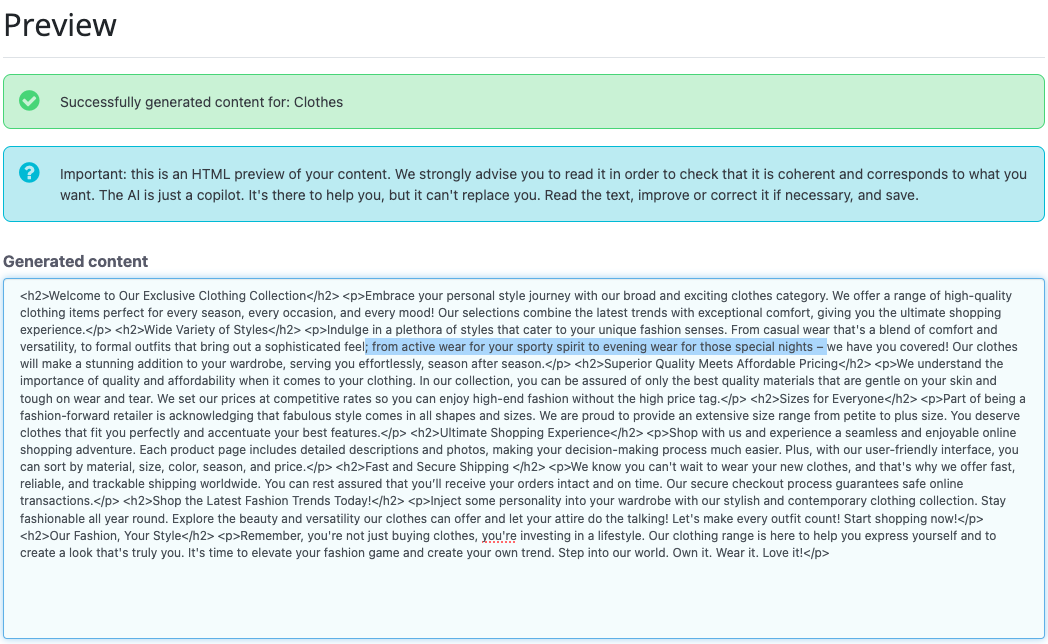
Before saving, check the selected field and language: existing content may be replaced. Keep a copy of the existing text if you may want to reuse it. Then check the result in the back office and on the storefront if the category is visible.
Access from the module configuration
In “Copilot access”, click “I need my copilot to write content”. This opens the same tool; follow the back-office menu steps above.