What's the difference between classic remarketing and dynamic remarketing?
Remarketing lets you show ads to people who previously visited your store. Dynamic remarketing personalizes those ads with products they interacted with. Tracking and personalization depend on consent and account eligibility, among other conditions.
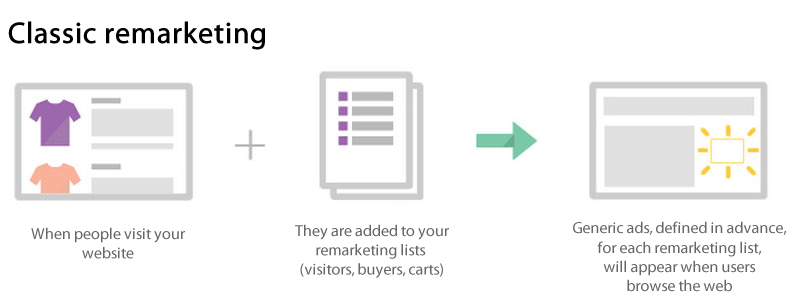
Classic remarketing: classic remarketing shows generic ads to people who previously visited your store; the ads are not personalized with the specific products they viewed.
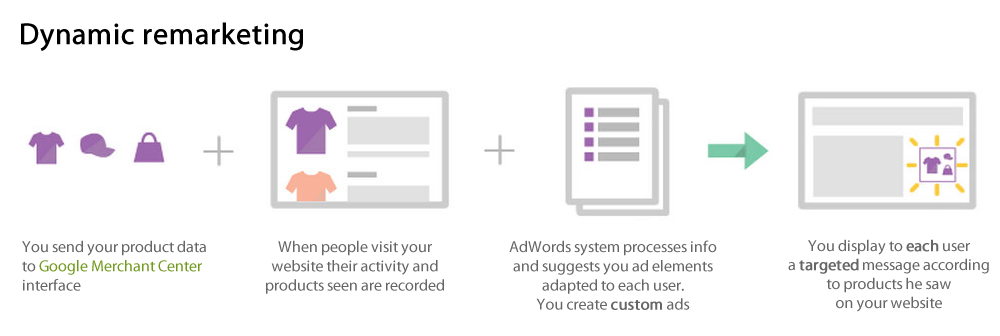
Dynamic remarketing: it’s an advanced remarketing. You can send to your customers and visitors an ad with the specific products or services they have seen on your shop. Because the message is adapted to users, you can encourage them to return to your website to complete what they had begun.
Dynamic remarketing can personalize ads using your catalog. Results depend on your campaigns, audiences and available data. Here are other reasons to use dynamic remarketing:
- On your Google Ads account, the product recommendation engine will pull products and services from your feed, determining the best mix of products for each ad based on popularity and what the visitor viewed on your site.
- Google Ads predicts which dynamic ad layout is likely to perform best for the person, placement, and platform where the ad will show.
For more info about Google Ads dynamic remarketing, click here.
In order for Google to show your users dynamic ads, that is, the products or services they viewed on your site, you must first export your products and any information about them to Google Merchant Center. Our "Google Merchant Center (Google Shopping)" and "Google Merchant Center PRO (Google Shopping)" modules allow you to do so. Then, once your feed is validated by Google, you need to configure our "Google Dynamic Remarketing" module to install a tracking tag on your site pages and finally go to your Google Ads account to create your dynamic ads thanks to data collected by the tag.
To read the Google documentation about the different types of remarketing, click here.
Click here to know how to create dynamic remarketing campaigns.
The module installs the tag on your store; it does not create your campaign or feed on its own. For retail, the product IDs sent by the tag must match those in the Merchant Center feed. Then test your tag and check consent management.
These diagrams summarize the principle. Audience inclusion and ad delivery depend on consent, eligibility, available data and campaign settings; they are not automatic for every visit. The second diagram retains the earlier AdWords name, now Google Ads.