What is the product condition?
The condition attribute describes the product’s condition at the time of sale: new, used, or refurbished. Snapchat currently lists this attribute as optional product metadata. The module nevertheless includes it in the CSV.
Enter the actual condition in the product’s PrestaShop back-office page. In PrestaShop 9.2, open the Details tab and find Display condition on product page, below the attached files. Enable this display if needed to access the selector, then choose the product’s condition. In PrestaShop 1.7, this setting is under Options > Condition & References.
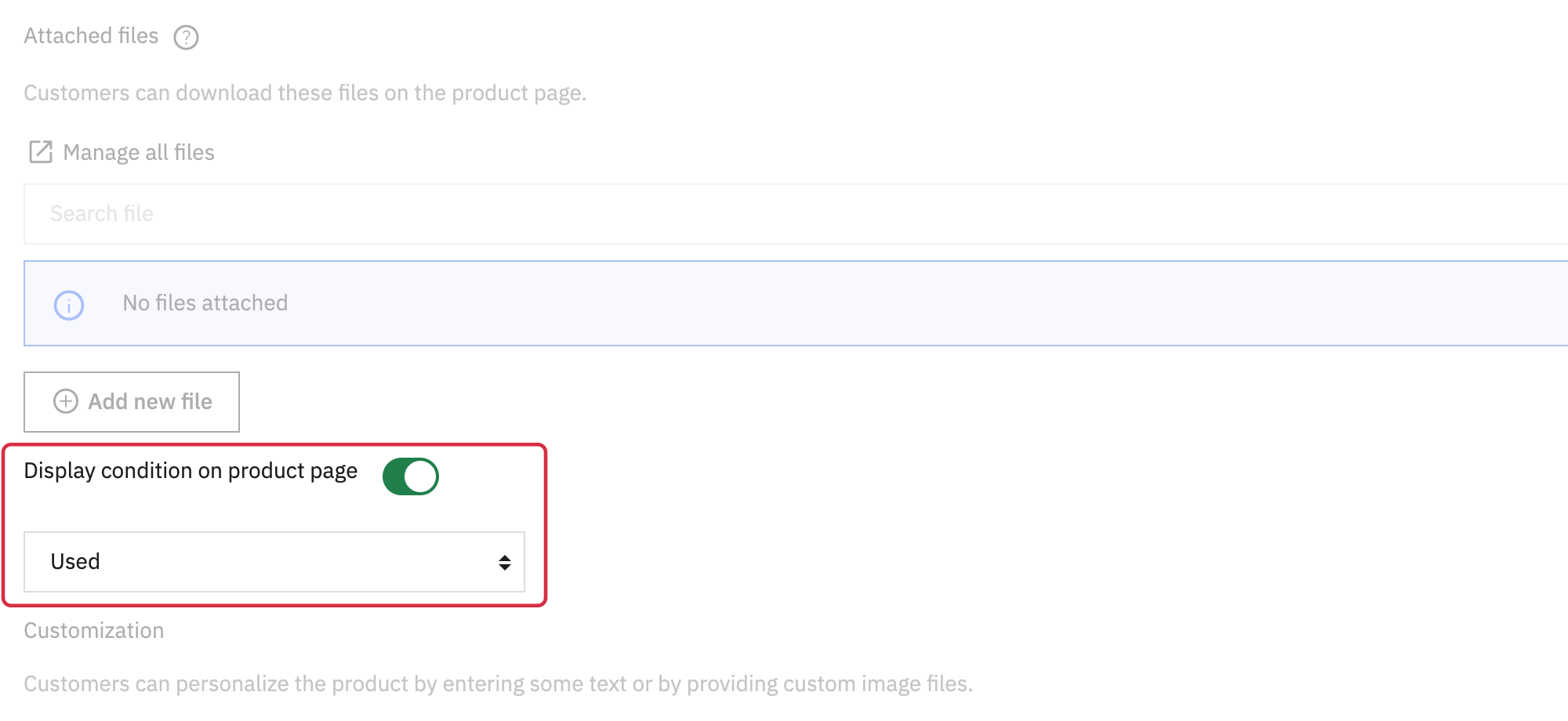
Example in PrestaShop 9.2; the location varies with your version.
The module retrieves the condition from the product page, including for its combinations. If the value is missing or is not one of the three recognized conditions, it uses the replacement value configured in Basic settings, under In general, what’s your products condition?. The default is “New”.
The module recognizes new, used, and refurbished. More detailed conditions offered by some PrestaShop versions, such as open_box, new_with_defects, or damaged, therefore use this replacement value. Check that it describes your products correctly before importing.
Choose a replacement value that matches the relevant products. If your catalog contains products in different conditions, set each product’s condition rather than relying on one general value.
For Snapchat, a refurbished product has been professionally restored to working order and comes with a warranty. See the official Snapchat catalog field list for the full definitions.