How to create my X (formerly Twitter) app?
In the module configuration, select the relevant shop if multistore is enabled. Open “Social login buttons configuration” and edit the X connector. Keep this form open to copy its redirect URL and enter the credentials.
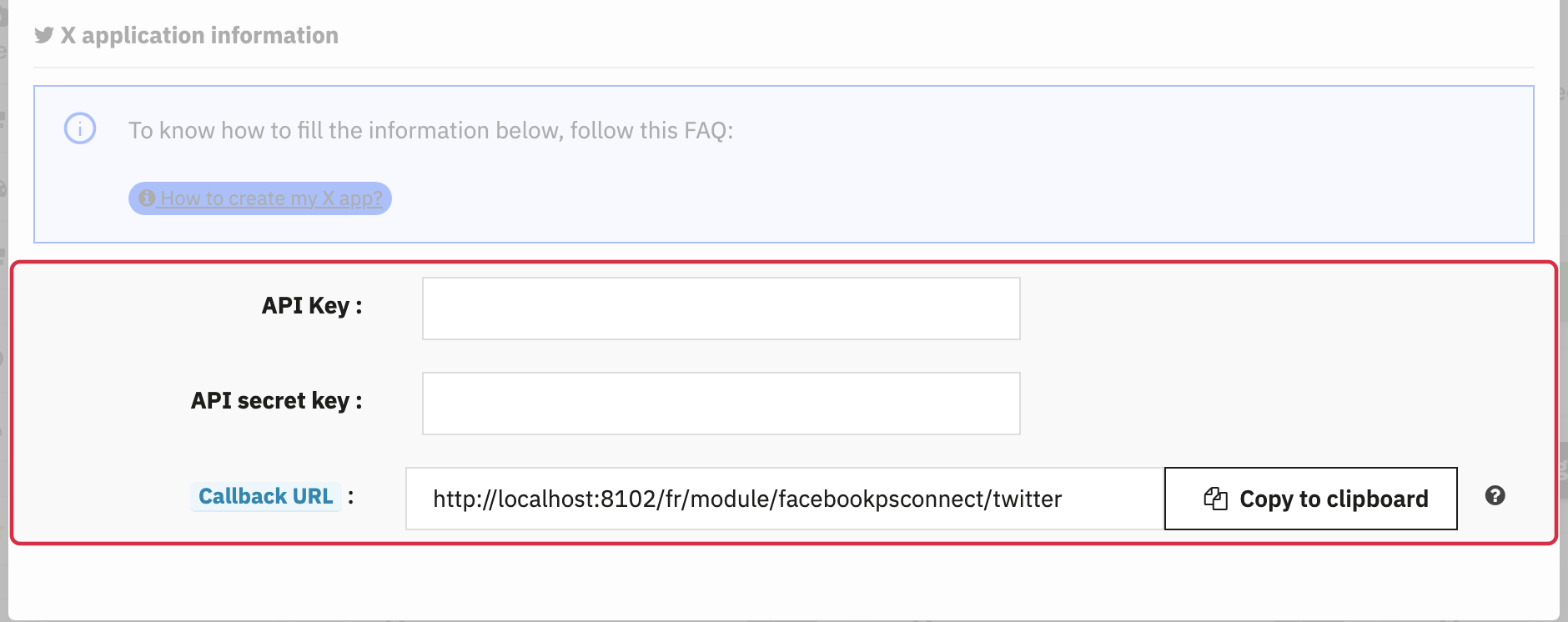
Configure the X app
Sign in to the X Developer Console and create or select your shop’s app. The connector shipped uses OAuth 1.0a. It expects an API Key / Consumer Key and an API Key Secret / Consumer Secret.
- Configure Sign in with X for the app and register the exact callback URL supplied by the module, using HTTPS for your production shop.
- Use the Read only permission level for the functions used by this connector.
- Copy the OAuth 1.0a keys into the module’s “API Key” and “API secret key” fields. Keep the form open while copying them.
Important: OAuth 2.0 Client ID / Client Secret credentials and the Bearer Token do not replace the OAuth 1.0a keys required by this version. Use your shop’s exact callback URL.
Credential types and settings are described in the official X app documentation. Actual API access depends on the account and permissions granted by X; check these in your console.
Understand the customer email address
This version does not retrieve the real email address from X. When first creating an account, it generates a technical address such as twitter123456@twitter.com. Requesting an additional email permission from X does not change this behavior.
To let customers enter a usable address, check the email address request option under “Basic settings”. Without a real address, order notifications cannot be correctly addressed to that customer.
Check the button translations, activate the connector and click “Update”.
To choose where the buttons appear, see module configuration and, if needed, advanced positions.
Then test the complete flow as a logged-out visitor: authorization with the provider, return to the correct shop, creation or retrieval of the customer account, and a session that remains logged in after reloading the page. An authorization screen alone does not confirm that shop login succeeded.