How to choose the construction mode of product IDs in the feed?
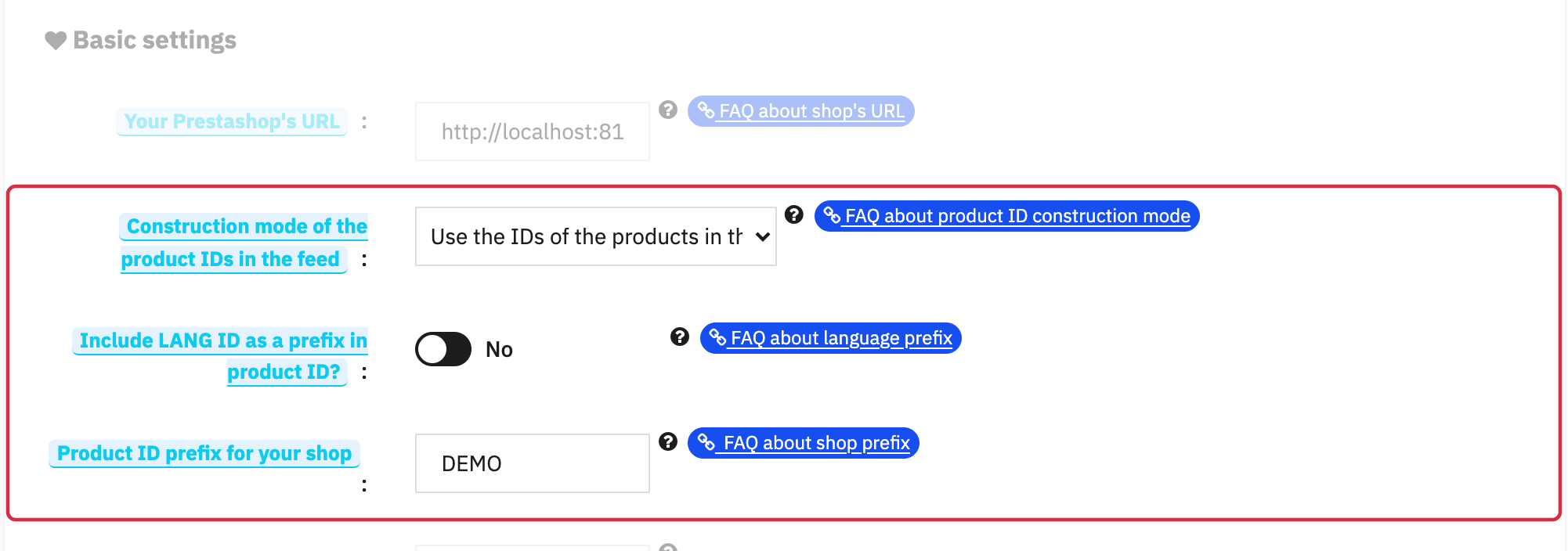
In your Facebook product feed, each item (whether it's a product or a combination of a product if you export by combinations) is identified by a code, called the item's feed ID. From version 1.5.0, the module offers different ways of constructing this feed ID. In the vast majority of cases, it is preferable to use the ID that your products have in your back office. This is why, if you don't know what to choose, we advise you to leave the option on "Use the IDs of the products in the back office". However, two other construction modes are also possible: using the references of your products or using the EAN codes.
1/ Use the IDs of the products in the back-office
If you choose to use the IDs of the products (or combinations) in the back office:
Then:
The module will build for each of your products a unique identifier (ID) composed of a shop prefix (if it is filled in), a prefix identifying the language (if you check "Yes" for the corresponding option), the ID of the product in the back-office, and, if you export each combination as a separate product, a separator and an identifier of the combination.
Item feed ID = SHOP PREFIX + LANGUAGE PREFIX + PRODUCT ID + SEPARATOR + SUFFIX ID COMBINATION
Example: BMEN1v12
To learn more about the use of the different ID prefixes, go to this FAQ. Please note that the language ID must not be activated if you want to use country feeds (see this FAQ).
If a catalog or tracking integration already exists, compare its IDs before changing modes. Keep IDs stable and verify equality with content_ids; choosing a mode does not guarantee automatic preservation of every campaign or audience.
2/ Use the product references
If you choose to use the references of the products (or combinations) to identify your products in the feed:
Then:
Item feed ID = REFERENCE
Example: Hummingbird_notebook_ruled
Attention : if you want to use the product references, make sure that:
- The references are filled in for all the products (or product combinations) to be exported. If the information is missing, the module will use the ID of the product in the back-office (first option) to avoid your feed being rejected by Facebook (the product ID in the feed is mandatory).
- Each reference is unique. If several products or several combinations have the same reference, Facebook will consider them as duplicates and will send you an error.
3/ Use the EAN codes
If you choose to use the EAN codes of the products (or combinations) to identify your products in the feed:
Then:
Item feed ID = CODE EAN
Example: 2222222222222
Attention : if you want to use the product EAN codes, make sure that:
- The EAN codes are filled in for all products (or product combinations) to be exported. If the information is missing, the module will use will use the ID of the product in the back-office (first option) to avoid your feed being rejected by Facebook (the product ID in the feed is mandatory).
- Each EAN code is unique. If several products or several combinations have the same code, Facebook will consider them as duplicates and will send you an error.
Other FAQs in this category
- Where to find my Business ID?
- How to configure the module ?
- How to create and install my Facebook Pixel?
- How to fill my shop's URL?
- What is the Conversions API and how to enable it in the module?
- How to automatically update my feeds (on-the-fly output or CRON task)?
- Do I have to ask the module to include the attribute IDs into combination URLs?
- How to create custom labels to segment my catalog?
- How to match my products with Facebook categories?
- How to create advanced exclusion rules?
- Do I need to rewrite numeric values into the combination URLs?
- My shop uses multi-currency : how to make Facebook detect the correct currency?
- Do I have to include the LANG ID in the product ID?
- How to test my Pixel code?
- Should I include anchors in my product URLs?
- What is the Facebook "Advanced Matching" feature?
- How can I use Facebook country feeds for several languages, countries and currencies?
- How to tag products reserved for adults?