What do the columns in the "Suppliers" report correspond to?
Columns in the Suppliers report.
Shop name
Name of the shop where the order was placed.
Supplier ID
Identifier of the supplier.
Supplier name
The product’s current default supplier in the catalogue. This grouping does not establish which supplier actually supplied a sold item.
Total quantity sold (Product total quantity)
Quantity of this supplier's products sold during the selected period.
Discount total excl. VAT (negative value) (Total discounts no tax)
Total amount of discounts applied using voucher code(s) (cart rules), on this supplier's products.
Please note: this column only calculates discounts resulting from voucher codes (cart rules). Discounts due to specific prices are not taken into account here.
Discounts tax amount
Tax associated with cart-rule discounts, shown as a negative amount.
Product total excl. VAT (Product total no tax)
Total amount of the supplier's products sold over the selected period, excluding VAT.
If a specific price was applied when the order was placed, it is taken into account. In this sum we also take the eco-tax into account, if one of the supplier's products is concerned, excluding VAT.
Ecotax total excl. VAT (Ecotax no tax)
Sum of the amounts corresponding to the eco-tax, for the supplier products concerned, excluding VAT. As a reminder, this total is already included in the Product total excl. VAT. This column is useful for your eco-tax declaration forms.
Total of product cost prices (Product total costs)
Sum of quantities multiplied by costs stored in the module’s tables. Importing those costs depends on available data and settings.
To choose the purchase costs used in the calculations, see the guide to purchase costs for orders placed before installation.
Gross profits (Product gross profit)
These are the profits on the supplier, before taking into account discounts (voucher codes):

Gross margin (Product gross margin)
It's a percentage. It is the proportion of gross profits on the supplier in relation to the total amount of the products of the supplier:


Net profits (Product net profit)
These are the profits on the supplier, taking into account discounts (voucher codes). Unlike net profits calculated on an order (as in the basic and full reports), net profits on a supplier do not take wrapping costs into account:


Net margin (Product net margin)
Net profits are expressed as a percentage of product revenue excluding tax, before cart-rule discounts: (product total excluding tax − cost − absolute discounts excluding tax) ÷ product total excluding tax × 100.
% of total sales (Percent total sales)
This column shows how much sales of the supplier's products represent of total sales for the selected period:

Cumulative % of total sales (Total sales cumulative)
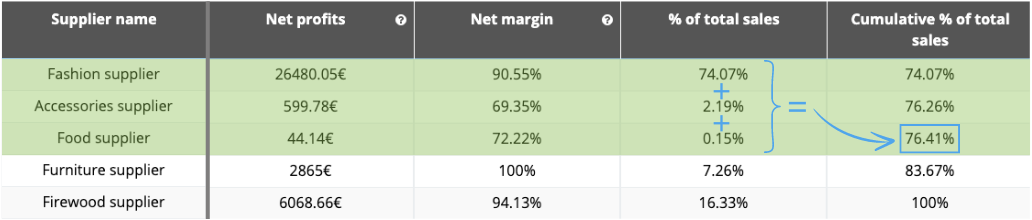
We add up the % of total sales for each supplier as we go down the column.
Example:
We export a "supplier" report and we position ourselves on the "Best Food" supplier. If we add up the percentage of total sales for the first 3 suppliers, we find a cumulative percentage of total sales of 76,41%, which means that the first 3 suppliers alone account for more than three-quarters of total sales for the selected period (76.41%):
% of total gross profits (Percent total gross profits)
This column shows the proportion of gross profits generated by the supplier in relation to total gross profits generated over the selected period:

Cumulative % of total gross profits (Total gross profits cumulative)
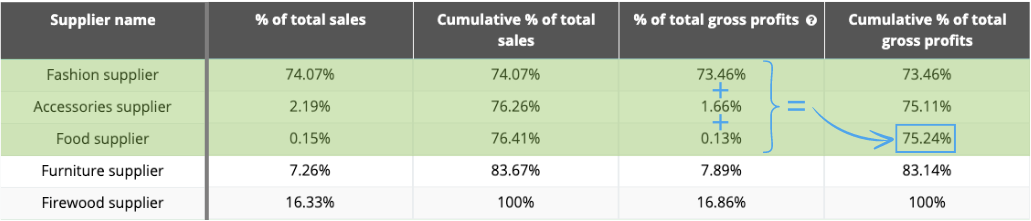
We add up the % of total gross profits for each supplier as we go down the column.
Example:
We export a "supplier" report and we position ourselves on the "Best Food" supplier. If we add up the percentage of total gross profits for the first 3 suppliers, we find a cumulative percentage of total gross profits of 75,24%, which means that the first 3 suppliers alone account for around three-quarters of gross profits over the selected period (75,24%):
% of total net profits (Percent total net profits)
This column shows the proportion of net profits generated by the supplier in relation to total net profits generated over the selected period:

Cumulative % of total net profits (Total net profits cumulative)
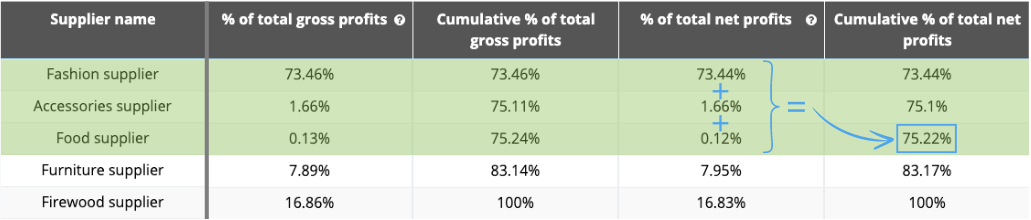
We add up the % of total net profits for each supplier as we go down the column.
Example:
We export a "supplier" report and we position ourselves on the "Best Food" supplier. If we add up the percentage of total net profits for the first 3 suppliers, we find a cumulative percentage of total net profits of 75,22%, which means that the first 3 suppliers alone account for around three-quarters of net profits over the selected period (75,22%):
Configuration and filters · Choose a report.
Other FAQs in this category
- How to use the "Customers" report?
- How to use the "Products" and "Categories" reports?
- How to use the "VAT", "Profits and margins" and "Credit notes" reports?
- What do the columns in the "VAT on products" report correspond to?
- How to export the collected amounts by VAT rate?
- What do the columns in the "VAT" report correspond to?
- What do the columns in the "Profits and margins" report correspond to?
- What do the columns in the "Product credit notes by VAT rate" report correspond to?
- What do the columns in the "Shipping credit notes" report correspond to?
- What do the columns in the "Credit notes" report correspond to?
- What do the columns in the "Customers" report correspond to?
- How to use the "Sales by country" report?
- What do the columns in the "Sales by country" report correspond to?
- How to use the "Brands" and "Suppliers" reports?
- What do the columns in the "Brands" report correspond to?
- What do the columns in the "Categories" report correspond to?
- What do the columns in the "Products" report correspond to?
- How to use the "Full" and "Basic" reports?
- What do the columns in the "Basic" report correspond to?
- What do the columns in the "Full" report correspond to?