Where to find my Business ID?
Do not confuse the IDs: the business portfolio ID (formerly Business Manager) is neither the Pixel/dataset ID nor the catalog ID. Use the module’s Business Manager field for this ID and its Pixel field for tracking.
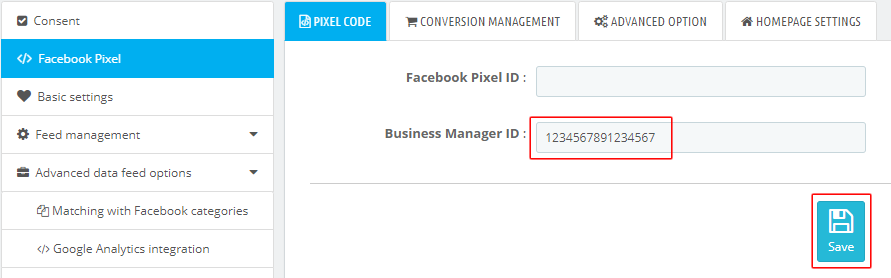
In the "Facebook Pixel" tab of the module, you are asked to fill your Business Manager account ID:

You will find this ID by going to "Business Settings" menu:
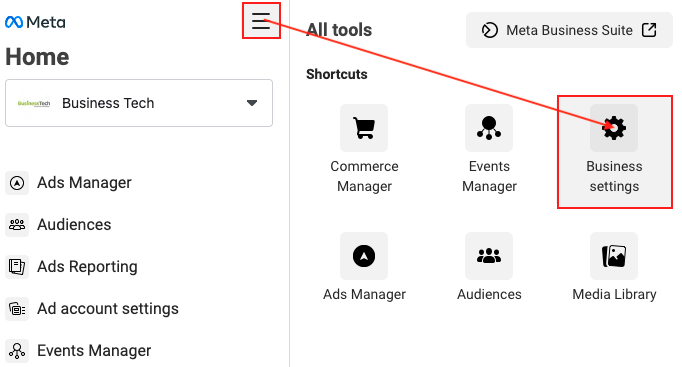
and by clicking on the "Business Info" tab in the menu on the left (scroll down the menu to find this tab):
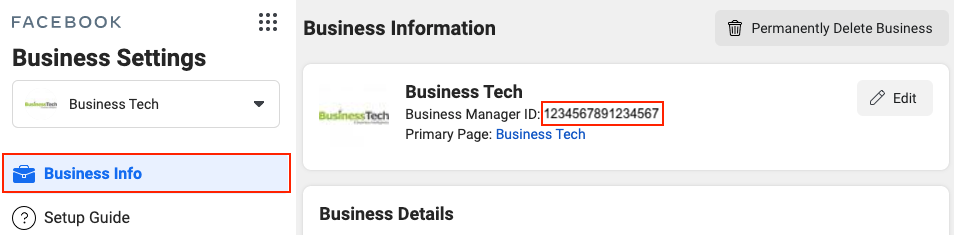
Copy the ID in the module and click on "Save":
Other FAQs in this category
- How to configure the module ?
- How to create and install my Facebook Pixel?
- How to fill my shop's URL?
- What is the Conversions API and how to enable it in the module?
- How to automatically update my feeds (on-the-fly output or CRON task)?
- Do I have to ask the module to include the attribute IDs into combination URLs?
- How to choose the construction mode of product IDs in the feed?
- How to create custom labels to segment my catalog?
- How to match my products with Facebook categories?
- How to create advanced exclusion rules?
- Do I need to rewrite numeric values into the combination URLs?
- My shop uses multi-currency : how to make Facebook detect the correct currency?
- Do I have to include the LANG ID in the product ID?
- How to test my Pixel code?
- Should I include anchors in my product URLs?
- What is the Facebook "Advanced Matching" feature?
- How can I use Facebook country feeds for several languages, countries and currencies?
- How to tag products reserved for adults?