How to create advanced exclusion rules?
Advanced exclusion rules let you remove products from the feed according to criteria you choose.
1. Create the rule
- In the module configuration, open Feed management > Product exclusion rules, then the Advanced exclusion section.
- Click Add exclusion rule.
- Activate the rule and give it a name that will help you find it, for example Exclude three notebooks.
Important: if you change About products with combinations after creating your rules, you must delete the rules and create them again. Exclusion handling depends on whether you export products by combination.
2. Choose the exclusion criterion
Under Exclusion based on, choose one of the four available criterion types:
- A word or a sequence of words: choose the product title, description or both, then enter the text to search for.
- A feature: select the feature and its value.
- An attribute: select the attribute and its value.
- A specific product or combination: start typing a product name, then select the required result from the suggestions. Repeat to add the other products.
For example, to exclude only three notebooks, choose A specific product or combination and add the three products to the list. Check your selection, then click Add this rule.
3. Check and validate
- Open the first summary section to check the criterion and selected items.
- Open the distinct products affected section to review the products excluded. Check their names and IDs before validating.
In the example below, the list contains three notebooks:
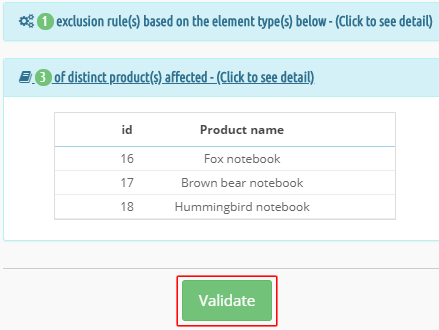
Click Validate to save the rule. Repeat these steps for your other rules.
From the rules list, you can then activate, deactivate, edit or delete rules and view the affected products.
Other FAQs in this category
- Where to find my Business ID?
- How to configure the module ?
- How to create and install my Facebook Pixel?
- How to fill my shop's URL?
- What is the Conversions API and how to enable it in the module?
- How to automatically update my feeds (on-the-fly output or CRON task)?
- Do I have to ask the module to include the attribute IDs into combination URLs?
- How to choose the construction mode of product IDs in the feed?
- How to create custom labels to segment my catalog?
- How to match my products with Facebook categories?
- Do I need to rewrite numeric values into the combination URLs?
- My shop uses multi-currency : how to make Facebook detect the correct currency?
- Do I have to include the LANG ID in the product ID?
- How to test my Pixel code?
- Should I include anchors in my product URLs?
- What is the Facebook "Advanced Matching" feature?
- How can I use Facebook country feeds for several languages, countries and currencies?
- How to tag products reserved for adults?