What is the Conversions API and how to enable it in the module?
Conversions API (CAPI) lets your server send events to Meta. In this module, storefront actions are still triggered and passed by browser JavaScript to a local controller, which prepares the server request. This integration therefore does not guarantee browser-independent tracking or bypass withheld consent.
Matching data is normalized and, depending on the field, hashed. Hashing is not encryption, and not every field in an event is hashed. Treat the data and access token as sensitive; never include the token in a screenshot or public page.
Prerequisites
- The correct Pixel/web source ID, used consistently for browser and server events.
- Meta permissions to manage the source and generate its access token.
- PHP cURL available on the server and permitted outbound API connectivity.
- Configured consent and the required data actually available.
Obtain the token in Meta
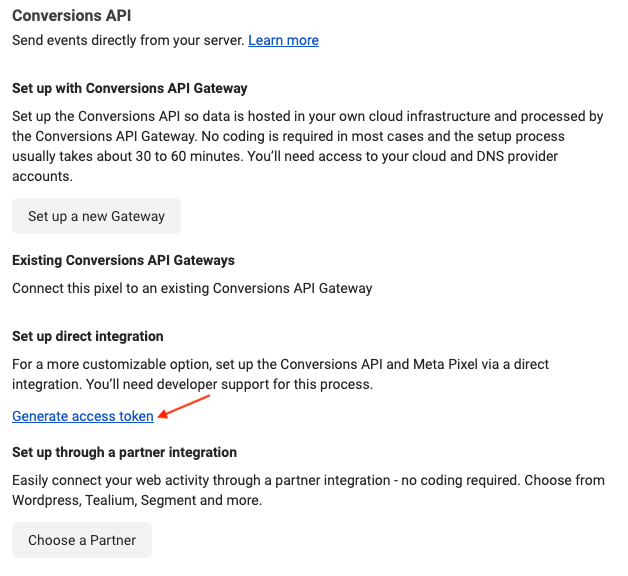
In Events Manager, select the Pixel, open Settings, then Conversions API. The official documentation specifies Generate access token under manual setup; visibility depends on privileges. Meta's automatic matching setting is separate from the module's advanced matching option and is not an established universal prerequisite here.
Configure and test the module
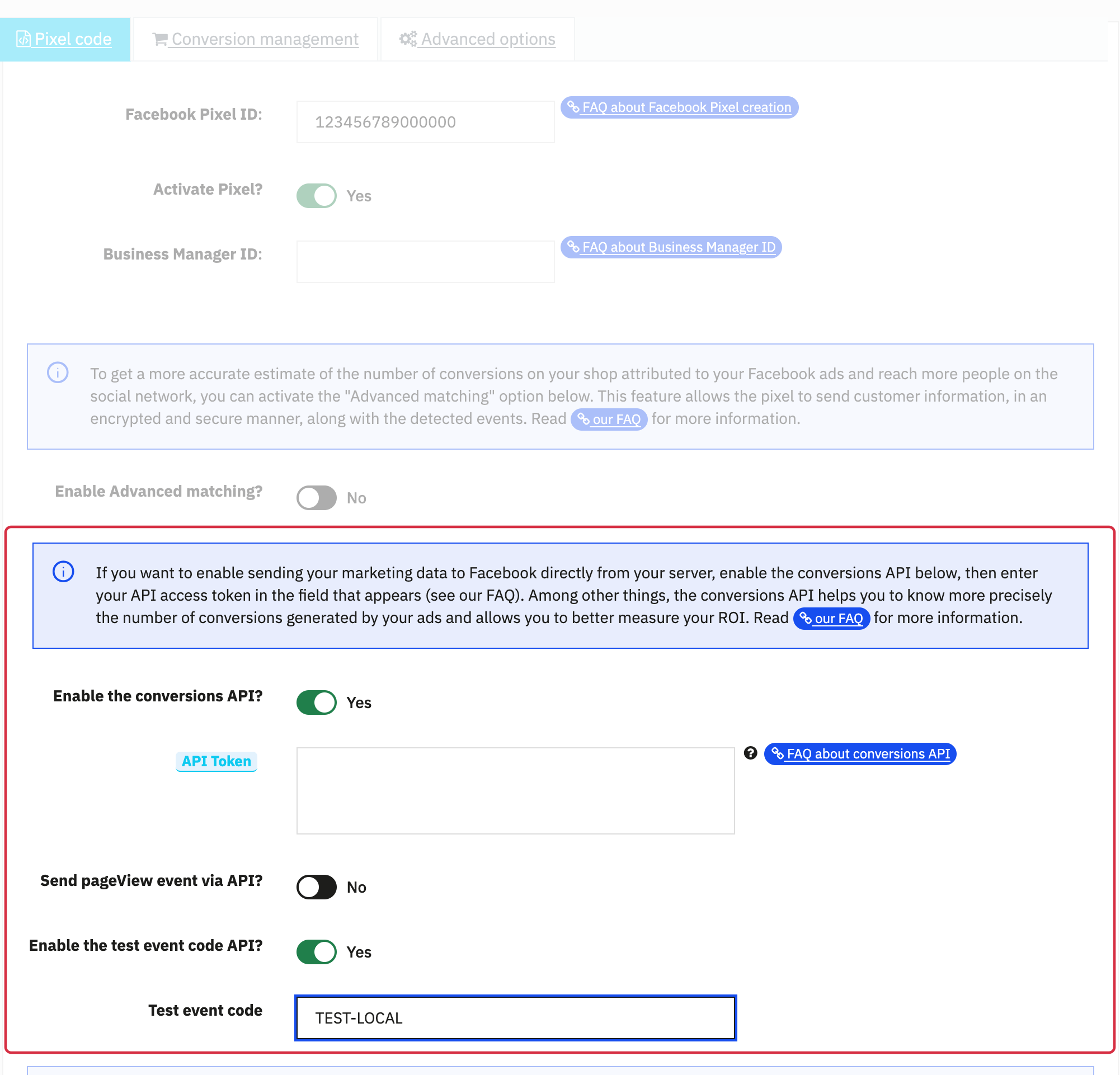
- In Facebook Pixel → Pixel code, check the ID and Pixel activation.
- Enable Conversions API, enter the private token and save. Reload and verify the settings.
- For server testing, obtain the temporary test event code from Events Manager, enable the matching module option and enter the code.
- Perform test actions with appropriate consent. In Test events, separately verify browser and server reception, name, ID, price and currency. See the official server tests and browser tests.
- Remove the temporary code and disable its mode when testing is complete.
A dataLayer entry, local AJAX request or preparation log is not proof of reception by Meta. Inspect the returned result and Meta's testing tool. For browser/server deduplication, see this explanation. The feature guarantees neither recovery of every conversion nor reduced advertising costs.
The retained earlier illustrations below show examples and navigation landmarks. Names, dates and layouts may differ in your version; follow the checks described in the text.
Other FAQs in this category
- Where to find my Business ID?
- How to configure the module ?
- How to create and install my Facebook Pixel?
- How to fill my shop's URL?
- How to automatically update my feeds (on-the-fly output or CRON task)?
- Do I have to ask the module to include the attribute IDs into combination URLs?
- How to choose the construction mode of product IDs in the feed?
- How to create custom labels to segment my catalog?
- How to match my products with Facebook categories?
- How to create advanced exclusion rules?
- Do I need to rewrite numeric values into the combination URLs?
- My shop uses multi-currency : how to make Facebook detect the correct currency?
- Do I have to include the LANG ID in the product ID?
- How to test my Pixel code?
- Should I include anchors in my product URLs?
- What is the Facebook "Advanced Matching" feature?
- How can I use Facebook country feeds for several languages, countries and currencies?
- How to tag products reserved for adults?