How to match my products with Facebook categories?
Mapping links your PrestaShop categories to the taxonomy offered for Meta feeds. It is separate from the storefront category path exported as product_type.
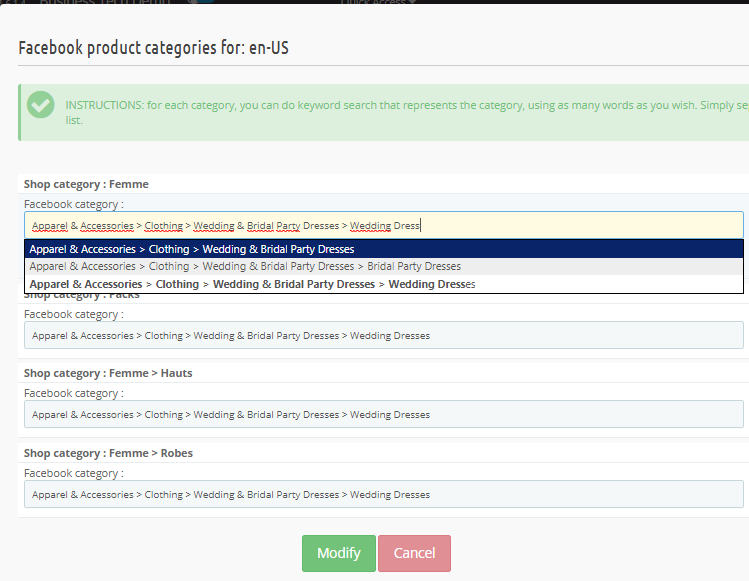
- Open Advanced data feed options → Matching with Facebook categories.
- Select the taxonomy used by the feed. Mapping follows that taxonomy; it does not automatically require a different table for every country when several feeds share one taxonomy.
- For each relevant default category, search for and select the most specific official category accurately describing the products.
- Save, regenerate and inspect the exported category and diagnostic warnings.
Warning: the module uses the product's default category. A mapping for another associated category does not replace it.
A local missing-mapping warning alone does not exclude the item from the feed. Check requirements for your Meta catalog separately. If a taxonomy or import does not load, check server network access and the data actually available before continuing.
The retained earlier illustrations below show examples and navigation landmarks. Names, dates and layouts may differ in your version; follow the checks described in the text.
Other FAQs in this category
- Where to find my Business ID?
- How to configure the module ?
- How to create and install my Facebook Pixel?
- How to fill my shop's URL?
- What is the Conversions API and how to enable it in the module?
- How to automatically update my feeds (on-the-fly output or CRON task)?
- Do I have to ask the module to include the attribute IDs into combination URLs?
- How to choose the construction mode of product IDs in the feed?
- How to create custom labels to segment my catalog?
- How to create advanced exclusion rules?
- Do I need to rewrite numeric values into the combination URLs?
- My shop uses multi-currency : how to make Facebook detect the correct currency?
- Do I have to include the LANG ID in the product ID?
- How to test my Pixel code?
- Should I include anchors in my product URLs?
- What is the Facebook "Advanced Matching" feature?
- How can I use Facebook country feeds for several languages, countries and currencies?
- How to tag products reserved for adults?