How to create advanced exclusion rules?
This feature requires Google Merchant Center PRO 1.7.0 or later.
Warning: if you change whether products are exported by combination after creating exclusions, delete and recreate the affected rules: their operation depends on that setting. Review affected products before changing your live shop.
Create and validate a rule
- Open Product feed management → Product exclusion rules → Advanced exclusion and select Add exclusion rule.
- Enable the rule, give it a name and choose a criterion: word or phrase, feature, attribute, or specific product/combination.
- Set the condition and click Add this rule. For example, choose the “Packaging” feature and its “Recyclable” value.
- Expand the summary to check conditions and distinct affected products. This preparation does not replace final validation.
- Click Validate. After confirmation, check the saved rule in the list and the excluded products.
- Update the feed and verify that the affected offers are absent from the actual XML served.
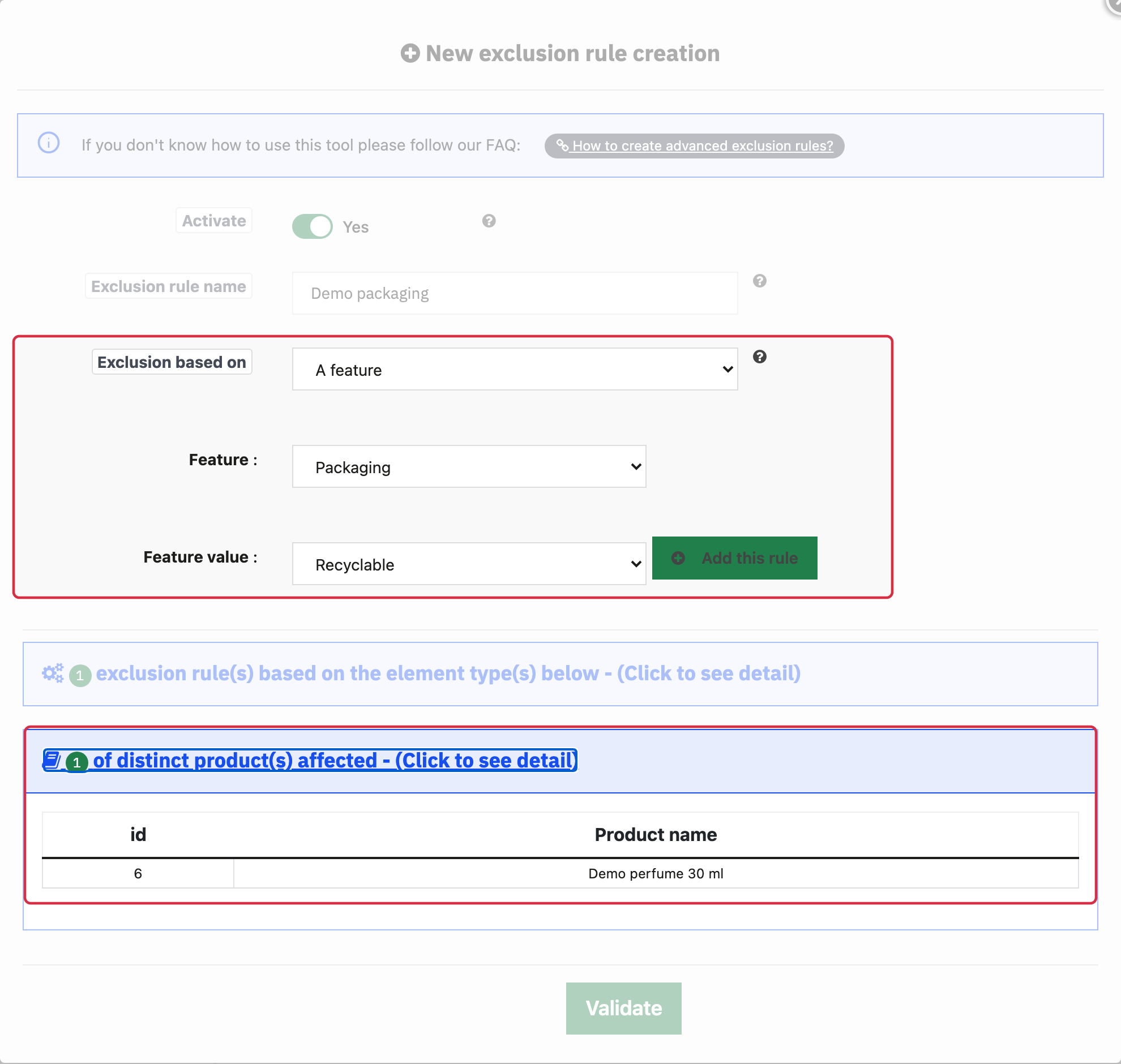
Example of a feature condition and summary before validation, using fictional data.
Supplier-based exclusion is not available in this creation list. Supplier selection in custom labels is a separate feature.
You can deactivate a rule to stop applying it. Regenerate the feed and check reinstated offers; Merchant Center changes appear only after retrieval and processing.
Other FAQs in this category
- Where can I find my store code?
- How to add a local inventory feed in Google Merchant Center?
- How to display my product price per measure unit?
- What are the additionnal features for product title of the PRO version?
- How to configure my local product inventory feed?
- How to configure my special offer (promotion) feed ?
- Google Customer Reviews: How to configure the feature?
- How to create advanced custom labels ?
- What is the difference between the classical module and its Pro version?
- Google Customer Reviews: Why does my badge say "No Reviews Available" when I've already collected reviews?
- Google Customer Reviews: What are the conditions for Google to request product ratings in addition to seller ratings?
- Google Customer Reviews: Where to find my Google Merchant Center account ID?
- Google Customer Reviews: Is the program available in my country?
- Google Customer Reviews: What is the Google Customer Reviews program?
- Can I temporarily stop certain products from showing in shopping ads?
- How to apply specific shipping labels?
- How to display the energy efficiency class or other energy certification of my products?
- What is the point of exporting the cost price of products?
- What are local inventory ads for?
- How to configure my product ratings feed ?
- How to switch from a classic GMC feed to a Pro one ?
- How do I export product features as product details?
- How do I export tags dedicated to Google AI Mode?
- Can I request the module to adapt the tax rate based on geolocation?
- How to indicate that my product is available for pre-order or that it will soon be back in stock?