How to only export products that are available for selling?
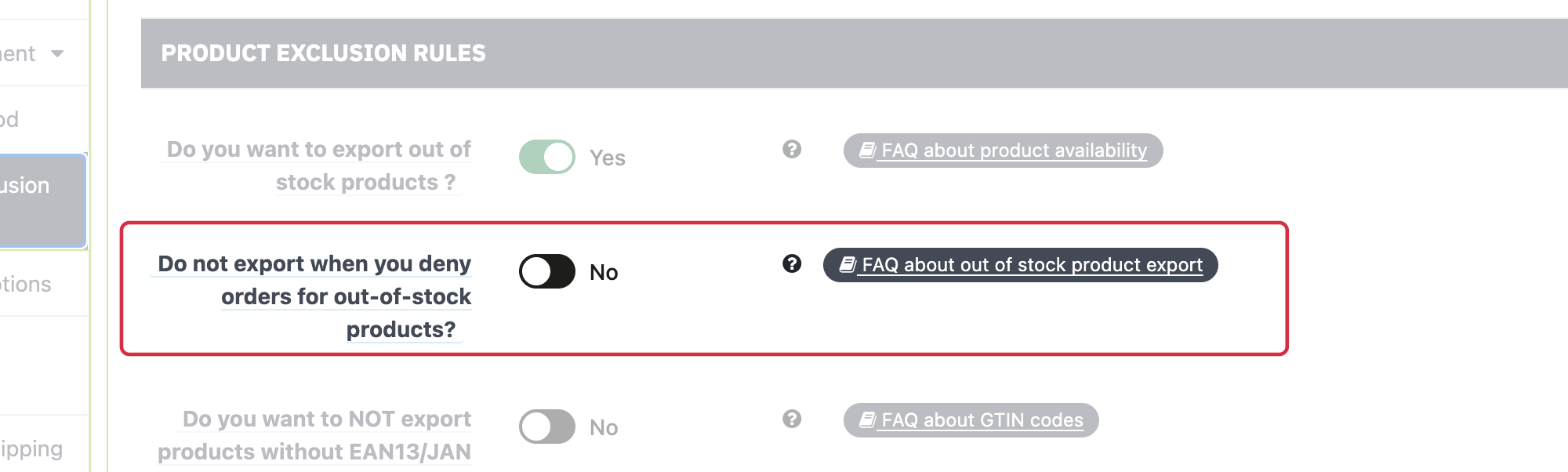
Under Feed management → Product exclusion rules, two options control out-of-stock items:
- Export out-of-stock products: when disabled, affected items are excluded.
- Export only out-of-stock products available for order: this additional filter applies when out-of-stock export is enabled.
Also check each product's out-of-stock behavior and PrestaShop's global setting.
This selection differs from backorder availability: see exported values.
Other FAQs in this category
- What is the simple ID?
- How to fill my shop's URL?
- Do I need to rewrite numeric values into the combination URLs?
- What is the Google "product type" attribute?
- Do I have to ask the module to include the attribute IDs into combination URLs?
- How to create custom labels ?
- How to match my products with Google categories?
- How to tag products reserved for adults?
- How to indicate the availability of my products on Google Shopping?
- What is the product condition?
- How is the ID of an item built in the Merchant Center feed ?
- How not to promote products in certain countries while using the same feed?
- What does the addition of the utm_content parameter in my product links allow?
- How to automatically update my feeds (on-the-fly output or CRON task)?
- How to exclude products from certain advertising channels?
- My shop uses several currencies: how to make Google detect the correct currency?
- How to quickly configure my module ?